Buy the Amazon Signage Stick on amazon.com for $99.99, one time, with no subscription attached to the stick itself. Amazon sells it in seven markets, each at its own local price, and offers a quantity discount from 10 sticks. Content software, such as Brix, is a separate subscription.
Which "Fire Stick" do you need?
People call the Amazon Signage Stick "the Fire Stick." Amazon also sells an ordinary Fire TV Stick, a home streaming device for watching shows and movies. For store or office signage, buy the Amazon Signage Stick, not a Fire TV Stick. signage.amazon.com describes it as built for digital signage, and it needs a content management system, such as Brix, to show your content.
Buy one stick and set it up
- Buy the Amazon Signage Stick on amazon.com, $99.99 per device.
- Connect it to the TV's HDMI port and power it on.
- During the stick's own on-screen setup, pick "Brix Signage."
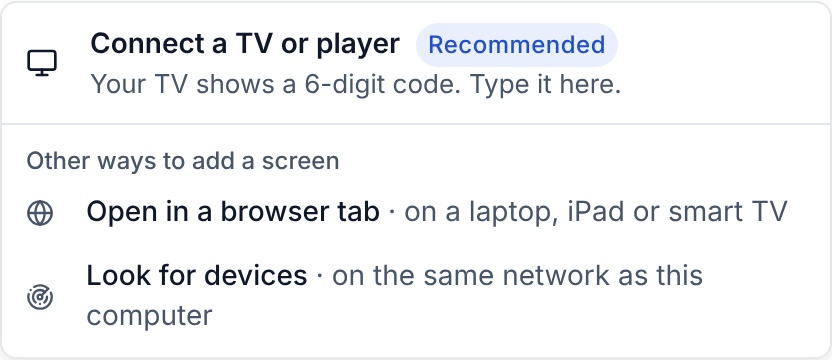
- In the Brix CMS, go to Screens, then Add screen, then Pair a hardware device.
Setup takes about 10 minutes.
Where to buy it outside the US
The Stick costs $99.99 on amazon.com in the US. The other six Amazon marketplaces that carry it:
- Canada: C$174.99 (amazon.ca)
- UK: £151.99 (amazon.co.uk)
- Germany: €151.99 (amazon.de)
- France: €151.99 (amazon.fr)
- Spain: €151.99 (amazon.es)
- Italy: €151.99 (amazon.it)
On January 7, 2027, Amazon raises the price: to $174.99 in the US, C$245.99 in Canada and €156.99 in Germany, France, Spain and Italy. The UK price stays £151.99. See the Amazon Signage Stick price increase.
Outside those seven markets, Amazon does not sell the Stick: Amazon Australia has no listing for it. Use a player sold locally instead; Brix also runs on Fire TV devices, Android TV boxes and Windows PCs.
Two US retailers also carry it: Best Buy and CDW. Amazon's quantity discount starts at 10 Sticks: $94.99 each, and $92.99 each from 50.
What else to buy
The Stick has no Ethernet port. For a wired network, add Amazon's micro-USB Ethernet Adapter, $14.99.
Buying several sticks for a rollout
Order more than one Signage Stick in the same amazon.com purchase, or ask Brix to source them in bulk for a rollout across stores or sites, so you are not placing dozens of separate orders. Talk to us to plan a multi-screen rollout before you buy.
Amazon limits purchases to 50 Sticks. To buy more than 50, see the Amazon Signage Stick quantity limit.
One free Stick for a 30+ screen rollout
Rolling out 30 or more screens? Amazon gives you one free Signage Stick to test Brix. Contact Brix, and we arrange it with Amazon. You buy every other Stick in the rollout at Amazon's price: $99.99 each, $94.99 each for 10 or more, $92.99 each for 50 or more. For what else a rollout needs, read how to get a free Amazon Signage Stick.
FAQ
How much does the Amazon Signage Stick cost?
$99.99 in the US, and its own local price in Canada, the UK, Germany, France, Spain and Italy. See the full price breakdown for the cost per screen with software, and the Ethernet adapter.
Does the Signage Stick come with software to show my content?
No. The stick plays content through a content management system you choose, such as Brix. Read the full review of running Brix on the Signage Stick, or compare CMS options for it.