Retail Digital Signage Software: A Store Guide
What retail store screens should show, where they go, the player and software to choose, what a store or chain pays, and the mistakes to avoid.
Retail digital signage software is the cloud service that decides what every screen in your stores plays: this week's promotion in the window, an upsell at the register, a new line by the fitting rooms. You build the content once, schedule it, and every store changes on time with no printing or shipping.
Each screen needs a TV, a media player behind it (about $40 to $100) and the software (usually $6 to $30 per screen per month).
What should store screens show?
- Promotions and campaigns. Sales, markdowns and seasonal campaigns, starting and ending on set dates at every store. See digital signage for in-store promotions for what makes a promo screen sell.
- The window. Today's offer, new arrivals or a product loop for people walking past. Motion catches the eye from the sidewalk; a static poster on a TV does not.
- Register and queue ("the TV by the counter"). Add-ons, gift cards and loyalty sign-up for the minute a customer stands still.
- Next to the product. A screen on an endcap or shelf showing how the product is used, next to where it sits.
- Department and wayfinding signs in a large store: what is on which aisle, today's offers per department.
- Reviews and social proof. Your Google rating or your own Instagram posts.
- Staff screens. Targets, rotas and safety notices in the stockroom or break room, away from customers.
Where should the screens go?
Start where customers stop or decide:
- The register, where every buyer waits.
- The window, for footfall.
- The entrance, for this week's campaign.
- High-margin displays and endcaps, where a screen sells the product next to it.
A small store can start with one screen at the register and one in the window, then add screens where sales data shows people linger.
What hardware does a store need?
- Indoor screens. 32 to 55 inches, depending on viewing distance. A plain TV works indoors.
- Window screens. A home TV washes out in direct sun. A window facing the street needs a high-brightness commercial display (commonly rated 2,500 nits or more) built for sun and long hours.
- A media player behind each screen. The Amazon Signage Stick costs $99.99, an Android box such as the Walmart onn. 4K costs $39.98, and a BrightSign player costs $380 to $1,335.
- The Amazon Signage Stick for store TVs ("the Fire Stick"). The Signage Stick is a separate product from a Fire TV Stick. It starts in the signage app, with no home screen for staff to open. Amazon sells it at $99.99, $94.99 each for 10 or more and $92.99 each for 50 or more. The price rises to $174.99 on 7 January 2027: see the Signage Stick price increase.
- A wired network where you can. Store networks carry the POS, cameras and guest Wi-Fi. A cable keeps the screen off the busiest Wi-Fi in the building. Amazon's micro-USB Ethernet Adapter for the Signage Stick costs $14.99.
What does digital signage for a storefront window need?
A storefront window needs a brighter screen than an indoor display, often works best in portrait for a narrow window, and should turn off after closing instead of running all night.
- Brightness for daylight. Choose a panel bright enough for the sunniest hour, and use Custom per-day hours so the screen is on only while the store is open.
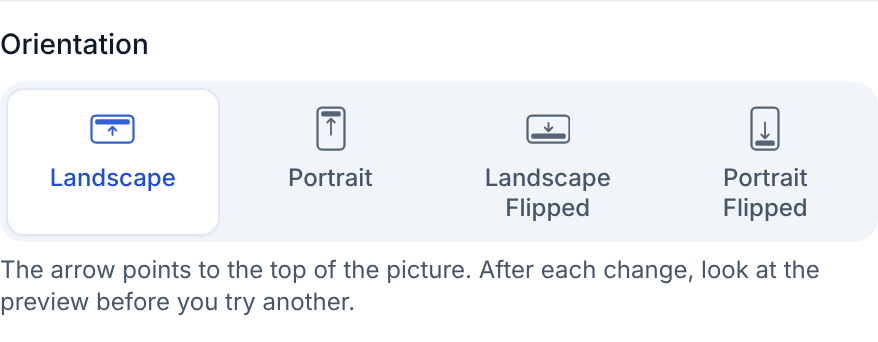
- Portrait for a narrow window ("turned sideways"). A tall, narrow storefront window often suits a portrait TV better than a wide one. Pick Portrait in the screen's Orientation setting. On the Amazon Signage Stick, Brix rotates the whole display through Amazon's device agent, so video plays upright too, not just pictures and text. See portrait mode on the Signage Stick.
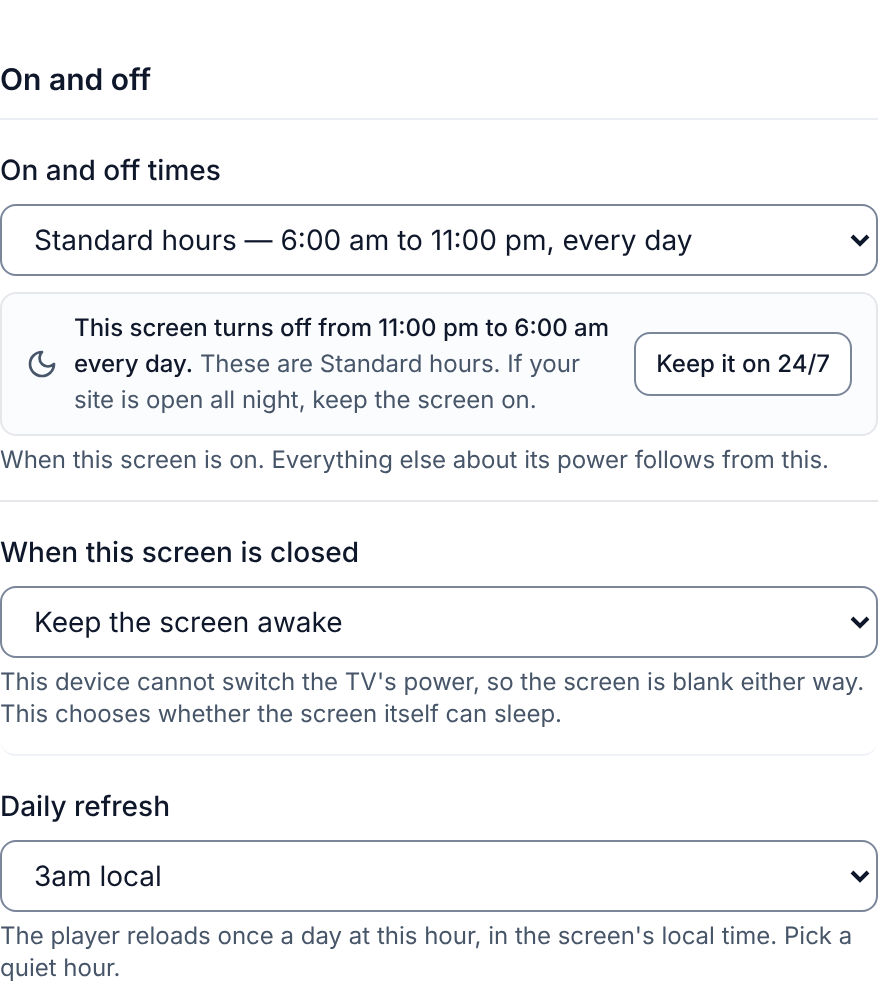
- Turn the TV off after closing ("is there an auto-off?"). A new Brix screen starts on Standard hours, 6:00 am to 11:00 pm, and the Signage Stick turns the TV off outside those hours over HDMI-CEC. Pick Custom per-day hours to match your opening times, or Always on if the window display should run through the night.
What should retail signage software do?
- Schedule campaigns by date and time, so a sale starts at opening on Friday and ends by itself.
- Target stores and screens, for example every window in one region, or every register screen in every store.
- Give you one login for every store. Head office sets the campaign from one account; a store manager changes only their own store's screens.
- Show live prices and stock from a spreadsheet, feed or the point of sale, so a price changes on the screen when it changes at the till.
- Keep playing offline. Content stored on the player keeps running when the store Wi-Fi drops.
- Report what played, if suppliers pay for screen time (retail media) and want proof.
- Show which screens are offline, so a dark screen in store 47 is found the same day, not at the next store visit.
What does it cost?
| Store size | Screens | Players (one time, at $99.99) | Software per year at $6 to $30 per screen per month |
|---|---|---|---|
| Boutique | 2 | $200 | $144 to $720 |
| Single store | 5 | $500 | $360 to $1,800 |
| 10-store chain | 30 | $3,000 | $2,160 to $10,800 |
TVs are extra. Software prices per screen per month, from each vendor's pricing page:
- Yodeck: $8 to $16.
- OptiSigns: $9 to $40.50 billed annually, or $10 to $45 billed monthly.
- ScreenCloud: $20 to $30 billed annually, or $24 to $36 billed monthly.
Features that chains need, such as roles per store, single sign-on or proof of play, are often only on the higher plans. See how much digital signage costs and the best digital signage software.
Mistakes stores make with screens
- A consumer TV in the window. It is unreadable at noon.
- Content made for print. A dense A4 poster on a TV is not read. One product, one price, one line.
- Stale campaigns. A screen still showing a sale that ended is worse than a blank wall. Give every campaign an end date.
- No one owns the screens in store. If only head office can change them, local problems (a sold-out item, a dark screen) wait for days.
- Consumer streaming sticks on guest Wi-Fi. They freeze at the busiest hour. Wire them and use a player built for signage.
Where Brix fits
Brix is signage software that runs on the Amazon Signage Stick, Fire TV, Android boxes and Windows PCs. It costs $6 per screen per month billed annually, or $8 billed monthly, the same price for one screen or three hundred, with every feature on every screen.
- One login for every store. Roles and locations let head office run campaigns everywhere while each store manager sees only their own screens.
- The same TV in every store. Tag every counter TV or cooler TV. A playlist item set to Only screens tagged then plays on those screens in every store.
- Campaigns on time. Schedules start and end content by date and time at every store.
- Live prices. Designs and the Menu Board app read a Google Sheet, CSV or JSON feed. Brix connects to Toast, Square and Clover; our team sets up the connection with you. Talk to us.
- Proof of play is included and off by default. Turn it on at Settings > Organization > Feature defaults.
- Offline. Brix stores content on the player, so the store TV keeps playing when the store Wi-Fi drops. On the Amazon Signage Stick, content can use up to half of the Stick's storage (about 12 GB usable). See offline playback on the Signage Stick.
- Screen hours. A new screen follows Standard hours, 6:00 am to 11:00 pm, and the Signage Stick turns the TV off outside them.
Rolling out 30+ screens? Amazon gives you a free Signage Stick to test Brix. We arrange it: talk to us.
Brix does not sell screens and does not measure who looked at a screen (no audience or dwell-time analytics). For a video wall that spans one picture across several screens, use players built for walls.
Start your free 7-day trial. No card needed. Several stores and want a walkthrough first? Book a demo.
Put Brix on your screens
Live in about 10 minutes. One plan: $6/screen/month billed annually ($8 month to month). No credit card to try.
Start Free TrialBrix for other industries